We can prove exactly what JavaScript ran in your users’ browsers


Right now, on our own production site, I can tell you the cryptographic fingerprint of every single JavaScript file that executed in a real visitor's browser this month. Not what our build system produced. Not what our CDN thinks it's serving. What actually ran, in the wild, on their machine.
Here's cdn.report-uri.com/js/* so far in August:
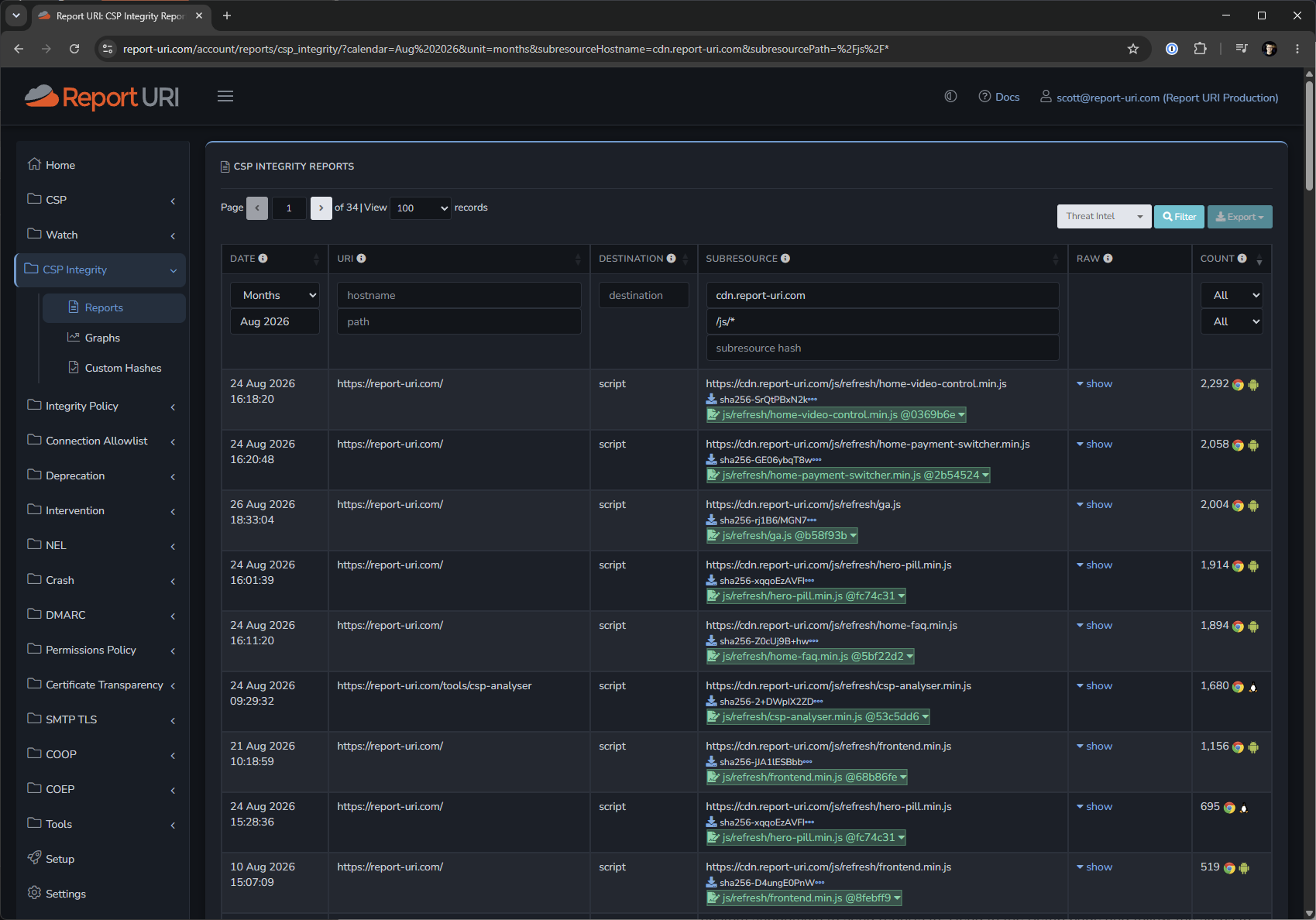
Every row is a file a real browser executed. sha256-SrQtPBxN2k… for home-video-control.min.js, 2,292 times. Next to it, in green, js/refresh/home-video-control.min.js @0369b6e — our own tag, our own build, tied to the git commit that produced it. A download icon next to the hash, because we hold a byte-for-byte copy of the file behind that fingerprint.
That is the entire pitch for our JavaScript Integrity Suite, and I think it's the most under-appreciated thing we've built. Let me walk through how the pieces fit together, because individually they're useful, but together, they're something else entirely.
The problem: it's the Wild West in the browser
When I ask most people what JavaScript runs on their site, I often get a blank stare. Sometimes, if I'm lucky, I get a list of URLs exported from Google Tag Manager or similar. It's kind of crazy to think that despite source control, SAST, DAST, code reviews, code audits and everything else we do on the origin, there is still a way to deploy code to production in most organisations that is completely unaccounted for.
The URL list from your tag manager about what JavaScript you deploy answers the question "where did we load code from?" It does not answer the question you actually care about, which is "what code was in that file?"
The gap between those two questions is where every Magecart-style attack lives, it's where XSS comes to bite you, and increasingly, it's where supply chain attacks are focusing. The URL never changed. The vendor is still the vendor. The <script> tag in your template is identical to the one you reviewed at launch. The bytes changed, at the origin, or at the edge, or on one CDN node in one region, for six hours, on a Tuesday.
When an attack happens in this scenario, you only find out when someone else tells you.
Layer one: fingerprint everything that executes
CSP Integrity is one single keyword to deploy in your CSP header.
That's it. No agent, no tag manager, no JavaScript of ours on your page. From that point, every browser that loads your site computes the SHA-256 hash of every script it executes and sends it to us.
Just to be clear: the browser is doing the hashing, on the file it actually ran! Not your CI. Not a synthetic crawler hitting your origin from a datacentre in Frankfurt. The browser of your real visitor, on their network, going through whatever middlebox, ISP proxy, edge cache or injected thing sits between you and them.
We then cross-reference every fingerprint against a database of almost 13 million verified JavaScript files. Known libraries come back named and versioned, jQuery 3.7.1, not as an opaque base64 string. And once a file is identified, we check it against our database of known JavaScript vulnerabilities and flag it if that version carries a published advisory for a vulnerability.
So before you've done any work at all, you get: a live inventory of executing code, identified by library and version, with vulnerable versions called out. It also doesn't matter if the code is first-party, third-party, fourth-party, or house-party, it will be fingerprinted and reported in the exact same way.
Layer two: teach it your own code
Here's the bit that made this really awesome for us internally.
The global fingerprint database can identify jQuery because millions of sites load jQuery. It cannot identify frontend.min.js from your build, because nobody else on earth loads it. Your first-party code, which on a modern app is most of your code, arrives labelled 'unknown'.
That's the wrong kind of noise. When most of your reports are "unknown", the genuinely unknown script hides in plain sight. You can't see the wood for the trees.
Custom Integrity Hashes fix the problem. You upload a JSON file of hashes you already know about, each with a label you choose:
{
    "defaultTag": "Report URI",
    "defaultStatus": "good",
    "hashes": [
        {"hash": "sha256-SrQtPBxN2k..."},
        {"hash": "sha256-GE06ybqT8w...", "tag": "js/refresh/home-payment-switcher.min.js @2b54524"}
    ]
}
We generate ours as part of the build, and we tag by file path plus commit hash. Look at what that buys you in the screenshot: js/refresh/frontend.min.js @68b86fe on one row and js/refresh/frontend.min.js @8febff9 on another. Same file, two different builds, both still executing in the wild during the same month. One may have come from an edge cache or a browser that hadn’t yet picked up the latest deployment, but both are identified precisely. We didn't have to go looking for that. It's just sitting there in the dashboard.
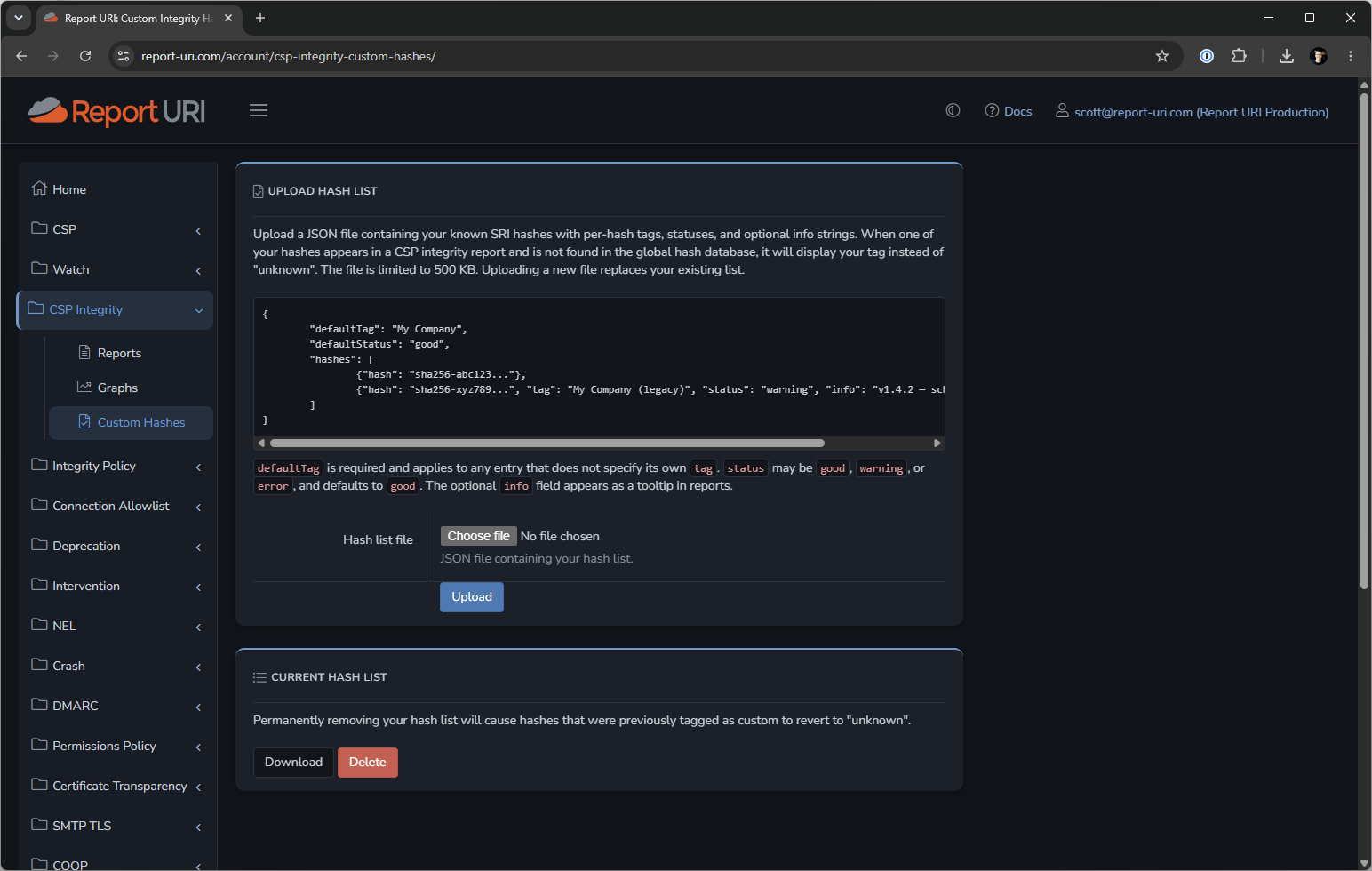
And now the word "unknown" means something again. Every script that executes on our site is either a library we recognise, or a file we built and can name down to the commit. Anything else is, by definition, a script we did not put there.
That is a genuinely different security posture. It's the difference between monitoring and knowing.
Layer three: get told when it changes
Script Watch builds a picture of the JavaScript dependencies on each of your sites and alerts you the moment a new one appears. New host, new script, something that wasn't in yesterday's picture, you get told, in near real time, by your visitors' own browsers.
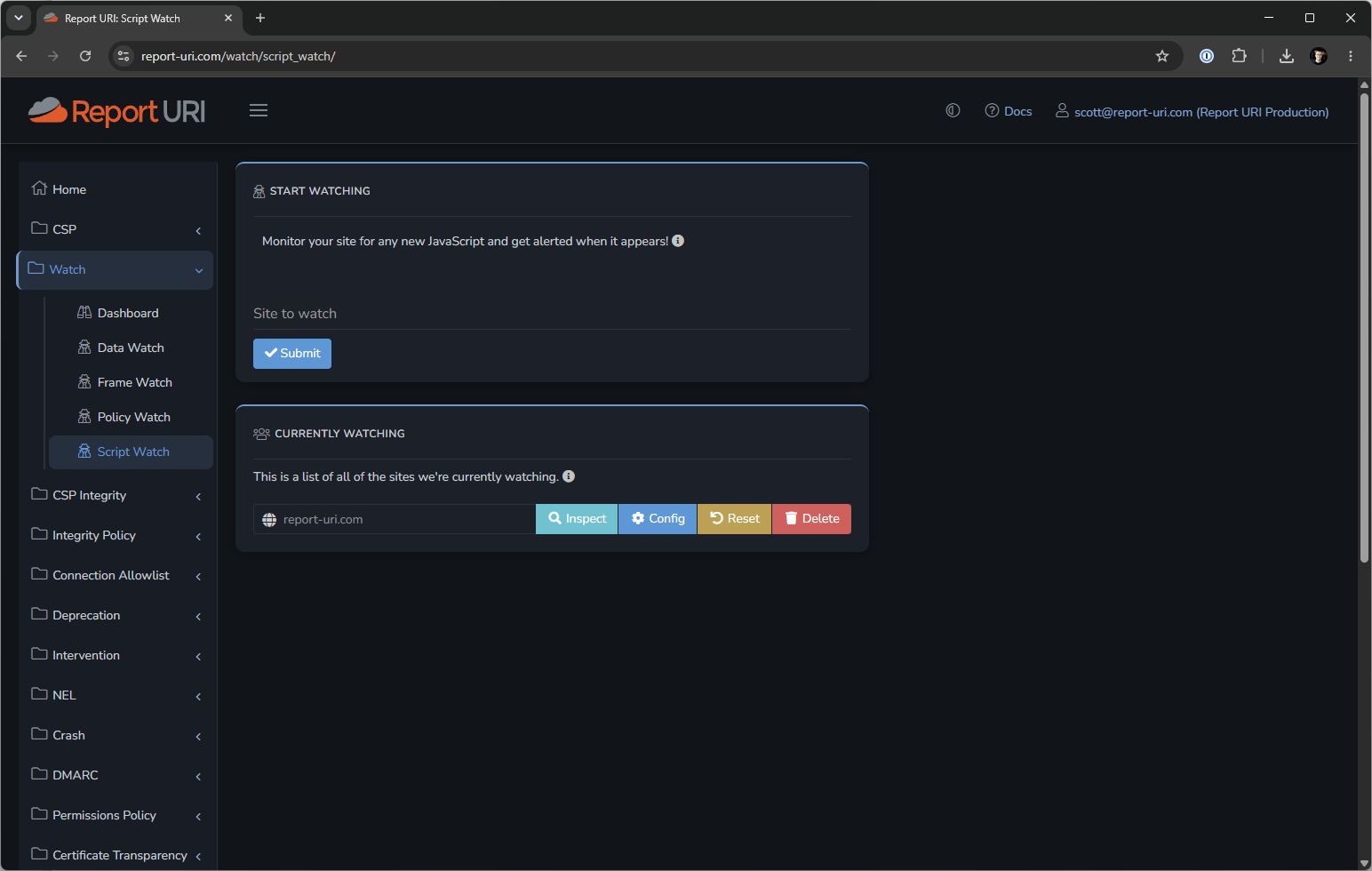
Combined with the layer above, the alert isn't "a script loaded". It's "a script loaded that you weren't expecting and it isn't a library anyone recognises."
Layer four: keep the code, not just the fingerprint
This is Script Vault, and it exists because of a hard truth about incident response: malicious code does not stay up to be examined later.
An injected payload is typically live for hours and pulled as soon as anyone notices, often by the attacker. By the time you're investigating, the origin is serving something clean. Fetching the URL now tells you what the vendor is serving today, which is precisely the thing you already know.
So when a fingerprint arrives, we go and fetch that file ourselves, hash what we receive, and compare it to what the browser reported. If they match, the copy we're holding is provably the code your visitor ran, and we keep it. If they don't match, we don't store it, and a mismatch is itself a signal that the origin is serving something different from what browsers are reporting depending on who asks.
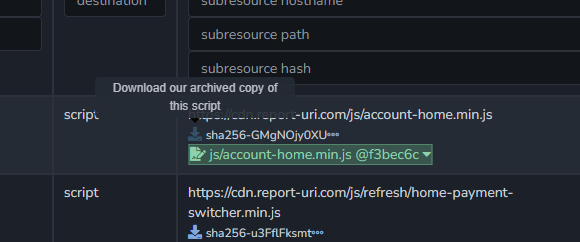
Where we hold a copy, the report carries a download link. That's the artefact an investigation actually needs. Not a description of what changed. Not a diff against a version you're assuming was there. The actual file itself.
Layer five: prevent unknown code from executing
Everything above so far is observation, and it's leaps and bounds ahead of where most organisations are, but you can do more than observe. Integrity Policy is the mechanism that allows you to only load code if it's known to be trusted.
That reports every script on your site that could have used Subresource Integrity but didn't. No SRI attribute, no protection, and now you know about it. If there's nothing to fix, you receive no reports. It's that simple.
Drop -Report-Only from the header name and the browser stops loading scripts that don't carry an integrity attribute. Full stop. Not "alerts you", not "flags for review", it refuses to execute.
That's the endgame: a site where unverified JavaScript simply cannot run.
Put together
Consider a new script appearing at 3am.
- CSP Integrity — a fingerprint you've never seen before arrives, from a real browser, within seconds of the first execution.
- Custom Hashes — it isn't tagged as one of your builds and it isn't a library anyone recognises. It's genuinely unknown.
- Threat Intelligence — we check the source against known-bad infrastructure and tell you if it's already burned.
- Script Watch — you're alerted, rather than finding out at the next audit.
- Script Vault — we've already fetched and fingerprint-verified a copy, so when the payload disappears at 6am you still have a copy.
- Integrity Policy — if you'd been enforcing, it might not have happened in the first place.
Six answers to one question that most teams can't answer. All from two response headers and zero code on your page.
What this means for PCI DSS
Requirements 6.4.3 and 11.6.1 ask you to inventory the scripts on your payment pages, authorise each one, justify why it's necessary, assure its integrity, and detect unauthorised changes to the page. The JavaScript Integrity Suite maps onto that and covers every single line.

Report URI is also an Associate Participating Organisation of the PCI Security Standards Council, and I contributed industry experience to the major revision that produced PCI DSS v4.0. We’ve since worked with customers and their QSAs to help implement these controls in real production environments—including websites operated by recognised payment brands.
Deploying it
Two HTTP response headers and a build step:
- Add
'report-sha256'to yourscript-srcand pointreport-toat your Report URI endpoint. Fingerprints start arriving from your first visitor. - Add
Integrity-Policy-Report-Onlyto see where SRI is missing. - Emit SRI hashes from your bundler, wrap them in the JSON format above, and upload the file at CSP Integrity → Custom Hashes. Re-upload on each release.
We built this because we wanted it for ourselves. The screenshot at the top is our real production site, and it gives us something our repository, build system and CDN logs never could: evidence of the exact JavaScript that reached real browsers and executed there.
It's a strange thought, but most websites out there have absolutely no idea what code they're actually running... Do you?
See what JavaScript is really running on your site
Start a free 30-day trial and build a live inventory from real browser data, no agent or JavaScript required.