Why we built an MCP endpoint instead of an AI chatbot

Every SaaS product I use has grown a little chat bubble in the bottom right corner. Ours hasn't, and it isn't because we forgot. When we sat down to work out what AI should look like in Report URI, the obvious thing to build was an assistant that lives in the dashboard, reads your reports and answers questions about them. After a lot of thought, we built something else: an MCP endpoint that your own AI agent connects to. This post is about why we chose that approach.
The question a chatbot can't answer
Here's a question a customer actually asks us:
I've got a spike of script-src violations from a CDN host I don't recognise. Is this an attack, or is it something we shipped?Think about what you need to answer that. You need the violation data, which we have. You also need to know what was deployed and when, which vendor tags marketing added to the tag manager last Thursday, whether that CDN hostname appears anywhere in the repo, whether it was in the last pull request, and what the CSP looked like before the change.
We have exactly one of those things.
A chatbot living in our dashboard can only answer the part it can see. To do better, it needs the rest — so we'd have to ask you for it. Connect your repository. Tell us your deploy schedule. Give us a webhook from your CI. Let us index your source. Upload your vendor inventory.
That's the moment the whole idea fell apart for me. To build an assistant good enough to be worth using, we'd have to become a company that holds, or at least has access to, a lot more sensitive information than I'm comfortable with. We don't want to hold that, you shouldn't want us to hold it, and your security team would be entirely right to ask why we need access to such information!
Inverting the problem
The thing is, something in your environment already has all that context, and you're probably already using it.
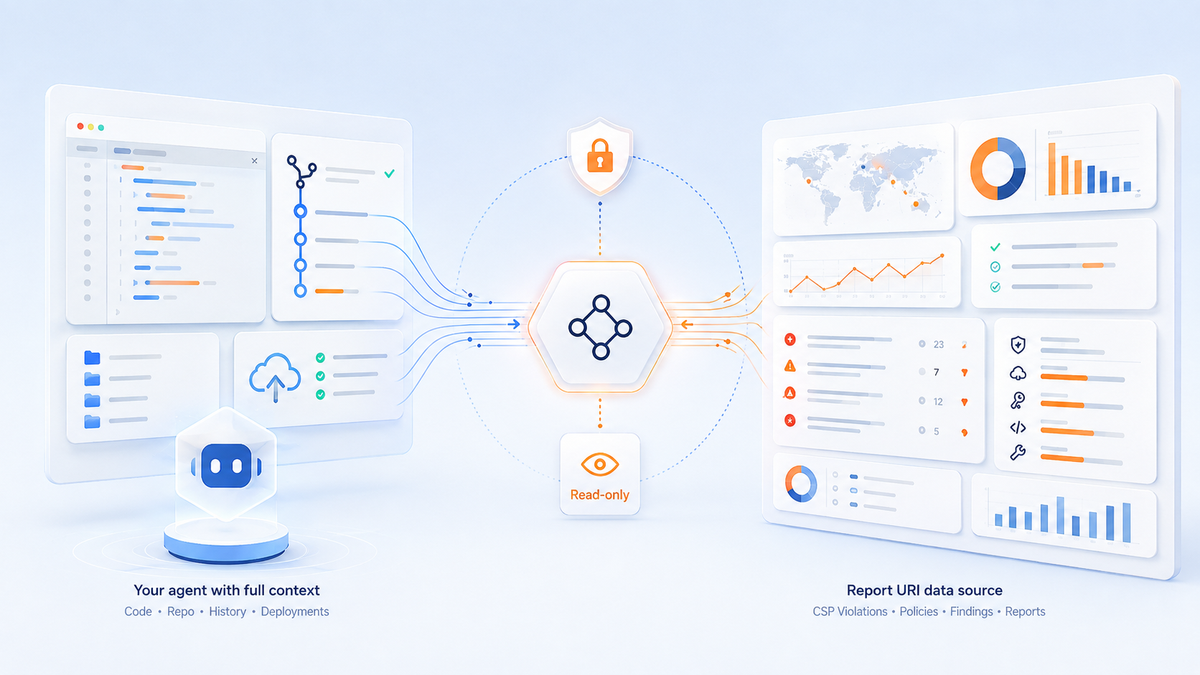
Your agent — Claude Code, Cursor, Codex, whatever you've got open — has access to your repository. It knows what your CSP header looks like because it can read the file that sets it. It knows what shipped on Tuesday because it can read git log. It knows your framework, your build pipeline, your vendor scripts. It has all the context that we were going to ask you to send us, and it got it without anybody exporting anything.
The only thing it doesn't have is your Report URI data.
So we shipped the missing half. Point your agent at https://mcp.report-uri.com/, authenticate with the same API key the REST API already uses, and it can read your account data: your reports with the full filter set, your CSP policies, your Wizard progress, your Script Watch and Data Watch findings, your quota, your setup values.
claude mcp add --transport http report-uri https://mcp.report-uri.com/ --header "Authorization: Bearer ruri_d_YOUR_KEY_HERE"
Now ask the question again. The agent pulls the violations from us, greps your repo for the hostname, checks whether it appeared in a recent commit, and tells you it's the analytics vendor that marketing added on Thursday. Or it tells you the hostname appears nowhere in your codebase, was registered eleven days ago, and you should probably look at that right now.
No context left your environment to get that answer. We never saw your code. You didn't fill in a form or paste any data to us.
What it looks like in practice
The clearest example is a CSP rollout, which is the thing people find hardest about Report URI and always has been.
The old flow is a documentation flow. You read a page, copy an endpoint, work out where your framework sets headers, paste something in, deploy, come back, check whether reports arrived, guess why they didn't.
With an agent connected, that whole loop closes in one conversation. It calls get_setup to read the endpoints that are unique to your account, rather than pasting the example values out of our docs — a mistake we see constantly in support. It works out how your app sets headers, because it can see your app. It adds a report-only policy, which can't break anything. It deploys. Then it calls back into the account to confirm reports are actually arriving.
There's a ready-made prompt for exactly this, if you'd rather not drive it yourself. Paste this into your agent:
Fetch https://docs.report-uri.com/md/agent-setup/prompt.md and follow it.
A chatbot in our dashboard could have told you how to do every one of those steps. It could not have done a single one of them, because none of them happen on our side of the wire.
The deliberate constraints
Looking at where we are already, there's enough for the MCP endpoint to be genuinely useful, and that's the feedback so far. There is room for improvement, there always is, but for now:
The tools are read-only. Every tool on the endpoint is a get_. There is no tool that changes your policy, your filters, your team, or your billing. An agent having a bad day can read your account and be wrong about it in conversation; it cannot reconfigure your security posture while you're in a meeting. This does cost something — the agent can't select a policy in the CSP Wizard for you, so it hands that decision back with a link — and we think that's a good trade-off.
No new credential. It's the same API key as the REST API, with the same rate limit of 120 requests per minute, revocable the same way, showing up in the same audit log. Connecting an agent doesn't widen your attack surface beyond the key you already had.
We don't run the model. There's no inference on our infrastructure and no conversation history on our side. We never see your prompts. Your agent runs where you run it, under whatever policy your organisation already approved for it, and we're just an authenticated data source it can call. If your company has already been through the exercise of deciding which AI tooling is acceptable, we don't reopen it.
The docs are part of the endpoint. Alongside the tools, the server exposes our documentation as MCP resources and a set of prompts for common jobs — reviewing CSP health, investigating a domain, summarising an account. The agent can read the manual before it acts, which turns out to matter a lot.
Where this falls down
A chat bubble works for someone who doesn't have an agent, doesn't want one, and just wants to ask a question in the dashboard. Our approach asks you to bring your own tooling, and if you haven't got any, it's trickier than you might like.
That's a real gap, but the fix for it isn't to reverse the decision — it's to make the dashboard itself clearer, which is work we're doing anyway.
If we do ever put something conversational in the product, it will answer questions about the data we already hold, and it won't ask you for the rest.
Try it
If you're already a customer, your API key is on the API page and the MCP endpoint uses it as-is. The setup for every client — Claude Code, Claude Desktop, Cursor, VS Code, Gemini CLI, Codex CLI — is on the AI Agents page, and the full tool reference is in the MCP docs.
Then ask your agent something you'd never have been able to ask us:
Pull my CSP violations from the last seven days, cross-reference the blocked hostnames against this repo, and tell me which ones we don't ship.
Not a customer and want to try this in your environment? Start a free trial today.