PCI DSS 4.0.1 and Requirements 6.4.3 and 11.6.1: What Changed for Payment Page Scripts

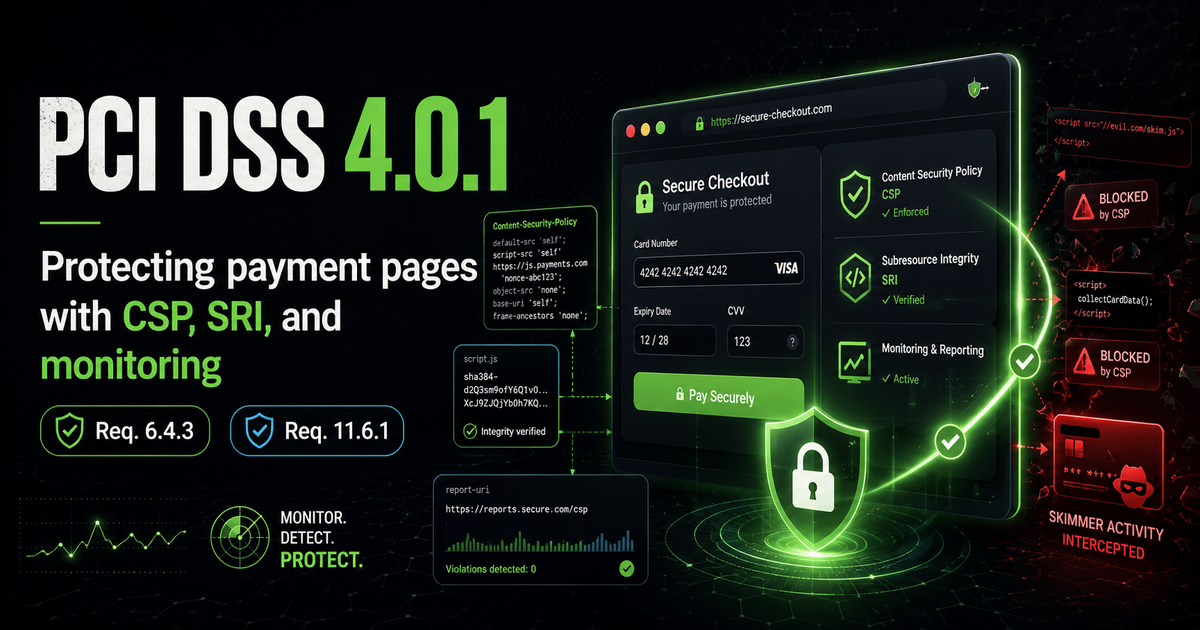
For over a decade, PCI DSS treated the browser as someone else's problem. Card data was protected in transit and at rest on the server, but the code actually running in the customer's browser — where card details are typed in — sat largely outside the standard's reach. PCI DSS 4.0 closed that gap. Two new requirements, 6.4.3 and 11.6.1, put client-side security firmly on the compliance agenda for the first time, and they were written with one threat in mind: Magecart.
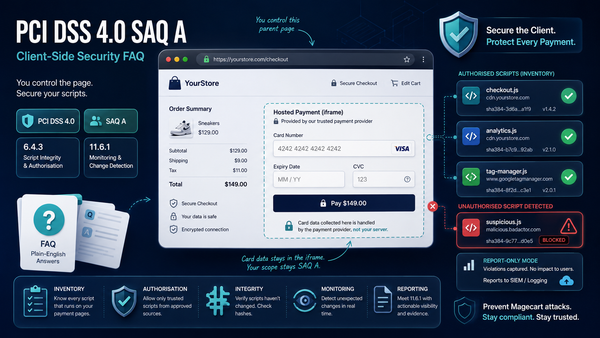
That gap is exactly the blind spot Report URI was built to cover. Every script on your payment page runs in a place you can't see — the customer's browser — and until 4.0 the standard never asked you to look. Requirements 6.4.3 and 11.6.1 now demand three things: know every script that runs, prove it hasn't changed, and get told the moment it does. That's script inventory, integrity, and continuous monitoring — the three jobs Report URI does automatically, from a single line of config.

The threat these requirements address
Magecart is the umbrella term for the criminal groups that inject malicious JavaScript — commonly called a digital skimmer — into e-commerce payment pages. Because the skimmer runs in the customer's browser alongside the legitimate checkout code, it can read card numbers, expiry dates and CVVs directly from the form as they are entered, then quietly send that data to an attacker-controlled server. The breaches at British Airways and Ticketmaster are the best-known examples, and both resulted in significant regulatory penalties and remediation costs.
What made those attacks so damaging is that the compromised code was often a third-party script the retailer had loaded deliberately — an analytics tag, a chatbot, a tag manager. The Ticketmaster incident, for instance, traced back to a compromised customer-support chatbot loaded across the site, including the payment page. If a third-party script can execute on the page where card data is entered, it can steal that data. Requirement 6.4.3 exists to bring those scripts under control.
What Requirement 6.4.3 actually asks for
Requirement 6.4.3 applies to every script loaded and executed on a payment page, and it sets out three obligations:
- Authorisation — a method must be in place to confirm that each script is authorised to run.
- Integrity — a method must assure the integrity of each script, so that unauthorised modification is detected.
- Inventory — a written inventory of every script must be maintained, together with a business or technical justification for why each one is necessary.
In practice, these map cleanly onto two well-established browser security features that predate PCI DSS 4.0 by years:
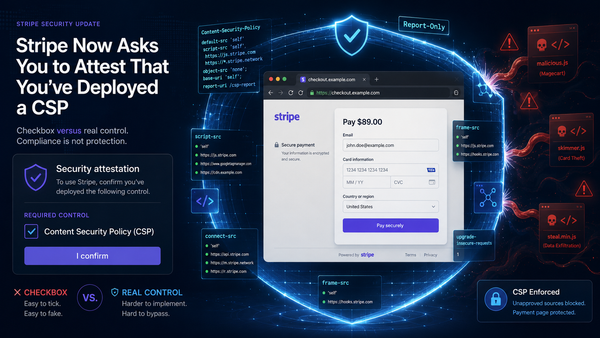
- Content Security Policy (CSP) provides the authorisation layer. A CSP tells the browser exactly which sources are permitted to load scripts, and can block everything else. Directives such as
connect-srcandform-actiongo further, restricting where data can be sent — cutting off a skimmer's exfiltration route even if it manages to load. - Subresource Integrity (SRI) provides the integrity layer. An SRI hash pins a script to a known-good version; if the file is modified, the hash no longer matches and the browser refuses to execute it.
The inventory requirement is where policy meets housekeeping. You need a living record of what runs on your payment pages, why it is there, and evidence that it is still exactly what you authorised.
Why "necessary" is the word that matters
The original PCI DSS 4.0 text defined a script as necessary only if it was needed "for the functionality of the payment page to accept a payment transaction." Read strictly, that would have removed almost everything that isn't the payment form itself — analytics, marketing pixels, conversion tracking, chatbots and the like. That interpretation was later softened in PCI DSS 4.0.1 to a "business or technical justification," but the underlying principle stands: the fewer third-party scripts on your payment page, the smaller your attack surface and the easier your compliance.
The most effective strategy remains minimisation. Strip the payment page back to what genuinely needs to be there, then apply CSP and SRI to what remains.
Detecting change: Requirement 11.6.1
Requirement 6.4.3 gets your payment page into a known-good state. Requirement 11.6.1 keeps it there. It calls for a mechanism that detects unauthorised modification of the security-relevant HTTP headers and the script content of payment pages, and alerts on change — continuously, as the page is received by the consumer's browser.
This is a detective control, and it is where real-time reporting becomes essential. A CSP configured with a reporting endpoint turns every policy violation into an alert: the moment an unauthorised script attempts to load, or an authorised one is tampered with, a report is generated from the real browser session. That is precisely the signal 11.6.1 is asking you to capture.
How Report URI helps
Report URI was built around exactly the browser telemetry these requirements depend on. Script Watch maintains a continuous, timestamped inventory of every script on your payment pages and alerts you the instant one is added, removed or modified — covering both the inventory obligation of 6.4.3 and the change-detection obligation of 11.6.1. CSP reporting captures what browsers actually block and allow, and Policy Watch alerts you if the deployed policy itself drifts from what you authorised. Because everything works through the browser's native Reporting API, there is no agent to install and no traffic routed through a third party.
The result is not just monitoring, but audit-ready evidence — the structured, exportable record a QSA needs to see that your controls were in place and working. Our PCI DSS 6.4.3 & 11.6.1 evidence pack maps each requirement to exactly what you can export.
Getting started
- Isolate a CSP to your payment page first; a single page is far simpler to lock down than an entire site.
- Inventory every script and remove anything that isn't justified.
- Apply SRI to the third-party scripts that remain.
- Add a reporting endpoint so you have continuous visibility and a compliance trail.
One point worth stressing: you do not have to switch your CSP to blocking mode to comply. A policy in report-only mode still authorises your scripts and reports anything unauthorised, which is enough to meet 6.4.3 — moving to an enforcing policy that actively blocks is stronger protection you can add at your own pace. Our step-by-step 6.4.3 implementation guide walks through the whole process.
For the full picture of how PCI DSS 4.0 treats client-side security — including SAQ eligibility and the evidence auditors expect — see our PCI DSS client-side security hub, or start a 30-day free trial and see your payment page scripts inventoried in minutes.