SuperPixel: The Card Skimmer Hiding Inside Your Own jQuery

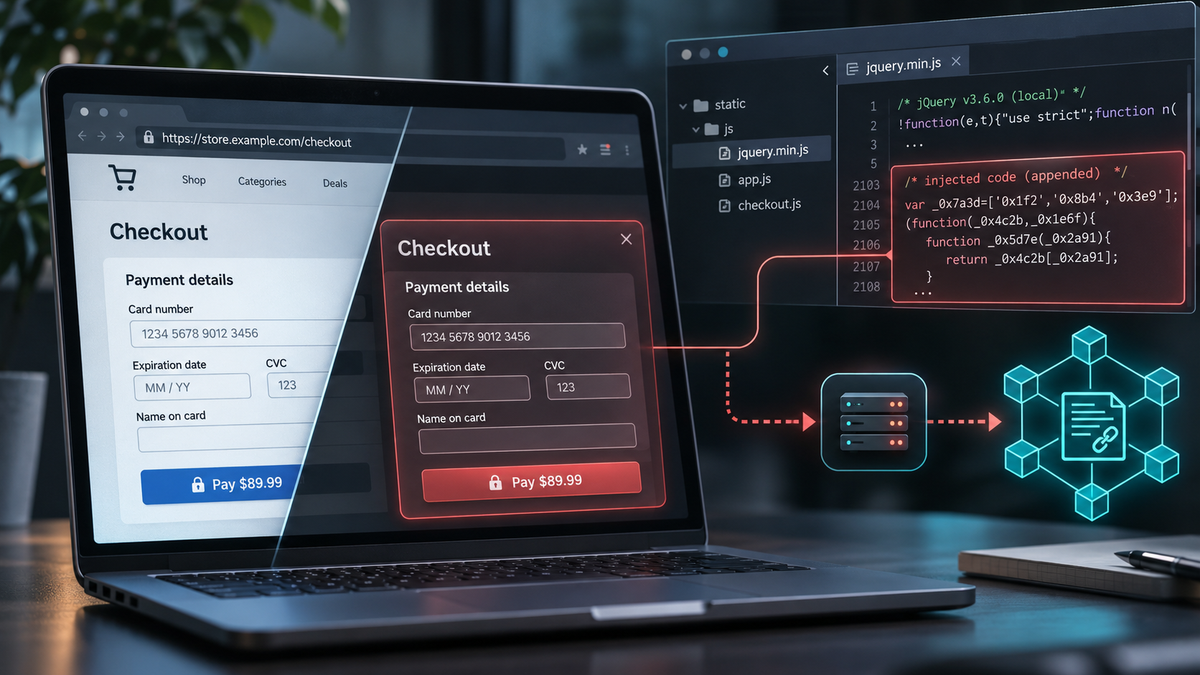
We've uncovered a new card-skimming campaign affecting more than 100 online shops so far, and the attackers are hiding their malware somewhere you might never think to look: inside the website's own copy of jQuery.
There are no suspicious third-party scripts to spot, no unfamiliar script domains to investigate, and nothing obviously new being loaded by the page. Instead, the attackers have modified JavaScript files the shops already host and trust, appending roughly a megabyte of obfuscated malware.
The malware, which calls itself SuperPixel, replaces genuine payment forms with convincing fakes, steals shoppers' card details, and retrieves its exfiltration destination from an Ethereum smart contract.
We've confirmed infections across WordPress, PrestaShop and OpenCart stores, with research ongoing. As far as we can tell, this campaign hasn't been publicly documented before.
Where the name comes from
It's a pretty cool name, but we didn't name this one like we did with DeadTag, the skimmer kit names itself. Once the obfuscation is peeled back, the same phrase appears all over the code, and in places that end up in the victim's page and the shopper's browser:
| Where | What it's called | What it's for |
|---|---|---|
| A global variable | window.__SuperPixelRunning |
Stops two copies running at once |
| The shopper's browser storage | superpixel_rendered |
Remembers that this shopper has already seen the fake form |
| Two injected stylesheets | #superpixel-original-hide-style, #superpixel-replace-hide-style |
Hide the real payment form |
| An HTML comment | <!--superpixel-render-guard--> |
Marks the elements the kit added |
The "pixel" part is of course a disguise. Tracking pixels are everywhere and nobody usually looks twice at one, but this is not a tracking pixel. It's a full form-replacement engine with its own renderer, triggers and templates, built to swap a shop's real payment form for one the attackers control.
How it gets on the page
This doesn't look good because it seems the attackers have write access to the shop's server, and they use it to append their code to a JS file the shop already loads. The original code is left untouched on the first line, and the skimmer goes on the line below it, with roughly one megabyte of obfuscated JS added.
These are the files we've seen it in so far:
- WordPress: the core jQuery file (
wp-includes/js/jquery/jquery.min.js) on most victims, and theme or plugin files on others, including page builders, contact forms, tracking plugins and theme bundles. - PrestaShop: jQuery UI,
tools.jsand Fancybox. - OpenCart: the theme's
common.js.
On several shops, the same file has the payload stacked two or three times, and in one case it has it six times! Each copy guards against the others with the __SuperPixelRunning flag, so it doesn't impact the operation of the skimmer, but it's indicative of another problem. The only thing I can think is that the injection of the skimmer is automated and the store has been hit with the same attack to inject it multiple times, meaning the vulnerability that let the attackers in hasn't been fixed.
What it does to the checkout
When a shopper reaches the checkout page, SuperPixel kicks into action and does the following:
- Watches the page. Five separate scanners run every 400 milliseconds, backed by page-wide watchers that react to every change in the page. They look for payment and billing fields, the checkout button, and the payment provider's form.
- Hides the real form and shows its own. It injects CSS to hide the genuine payment fields and renders a replacement from a template. The shopper types their card number, expiry date and CVC into the attackers' form instead of the payment provider's.
- Shows the fake form once per shopper. After rendering, it sets
superpixel_renderedin the shopper's browser storage. A shopper who comes back sees the real form, which makes "the checkout looked weird last time" much harder to reproduce. - Sends the data. The card and billing details are scrambled with XOR, base64-encoded and sent with an ordinary
fetch()request.
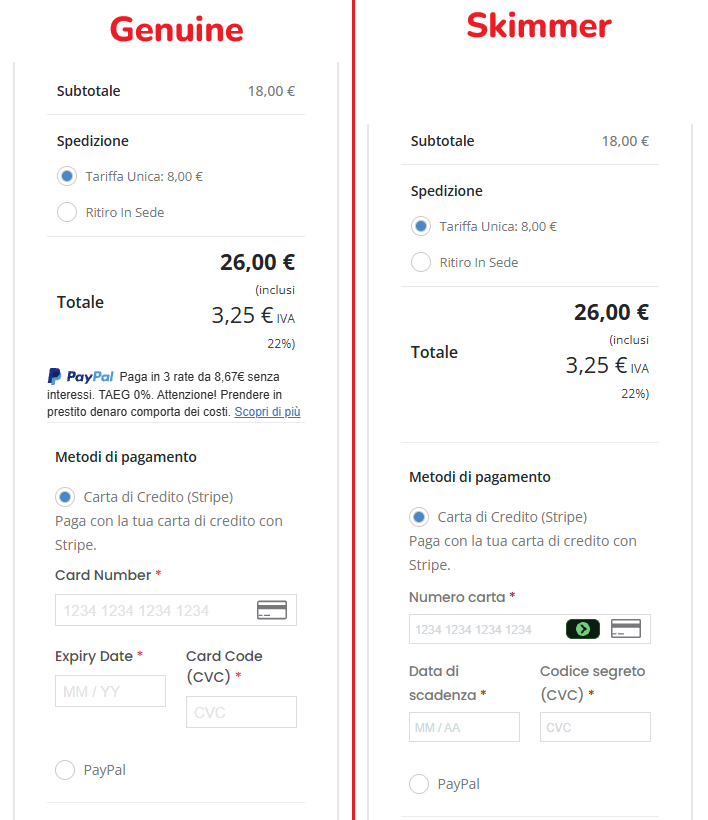
Here's a screenshot of a currently infected store showing the genuine payment form that shoppers should see, and the injected skimmer form that would steal your data if you used it. We used the superpixel_rendered flag to suppress the skimmer to get the screenshot.
Ethereum tells the skimmer where to send stolen cards
The skimmer code doesn't contain the address that it sends stolen card data to, instead, it asks the Ethereum blockchain.
Every copy of the skimmer contains a contract address and three public Ethereum endpoints (ethereum-rpc.publicnode.com, 1rpc.io and eth.drpc.org). At run time it calls a read-only function on the contract, and the contract replies with the URL to send the stolen data to. This technique is often called EtherHiding. Blockchain data can't be taken down, and the attackers can switch every infected shop to a new exfiltration endpoint address with a single transaction, without having to go back and touch any of the infected shops again. The current exfiltration endpoint is set to https://metrics-onclick.com.
The skimmer fights back
SuperPixel tries hard to make analysis painful, which is understandable from the attacker's perspective and something that is becoming increasingly more sophisticated:
- Every victim gets a different build. No two infected files we collected were identical, so blocking a file hash doesn't work. The function and variable names change, and all the readable strings are encrypted.
- It traps DevTools. The code builds the word
debuggerfrom two halves ('debu' + 'gger') and runs it on a timer. With DevTools closed, nothing happens. With DevTools open, the browser pauses again and again, and the page becomes almost unusable for anyone trying to look at it. - It's hard to read in DevTools. A one-megabyte single line of code often won't even display in the Network panel's response view.
On at least one victim we found a second, separate loader with its own bot detection, which only released its next stage to visitors who passed it. Even a real browser on a residential connection, with an item in the basket, got nothing back. Whether that belongs to SuperPixel or to another group sharing the same compromised server, it's a reminder that what a scanner sees isn't always what a shopper gets.
What shop owners should do
If you're running an online shop, particularly on WordPress, PrestaShop or OpenCart, this campaign is worth investigating.
- Check your JavaScript files. Look for unexpected changes to core libraries, theme bundles and plugin files, especially unusually large increases in file size.
- Compare files against known-good versions. For WordPress, verify core files against their official checksums, and inspect plugin and theme assets separately.
- Review outbound connections. Look for unexpected requests to Ethereum RPC services or unfamiliar collection domains, particularly during checkout.
- Check your checkout in a clean browser. SuperPixel uses browser storage to avoid repeatedly displaying its fake payment form, so an existing session may not reproduce the attack.
- Investigate the original compromise. Replacing an infected JavaScript file isn't enough if attackers still have the ability to modify it.
If you discover an infection, treat it as a potential payment-card compromise and investigate the exposure before restoring normal operations.
How Report URI can help
SuperPixel loads from the shop's own domain, inside a JavaScript file the site already trusts. A source-based Content Security Policy allowing scripts from 'self' won't detect that the file has been modified, so the malicious code can execute just like the original jQuery.
That doesn't mean CSP is powerless, a properly enforced connect-src directive can block the malware's attempts to contact Ethereum RPC endpoints and send stolen card details to its collection server, while CSP reporting can reveal those attempted connections.
This is why monitoring both script integrity and outbound connections matters, and here's how we can help:
- Subresource Integrity (SRI) on your own scripts. An
integrityhash on the jQuery tag means the browser refuses a file that's been edited, wherever it's served from. Integrity Policy can help you set this up. connect-srcreporting. SuperPixel has to talk to the Ethereum endpoints and to its collection server, which is new activity. This is what Data Watch would detect.- Watching what your scripts actually do, not just where they come from. A file you've served unchanged for months that suddenly grows by a megabyte, or starts contacting an Ethereum node, is the signal. Our JavaScript Integrity Monitoring would let you know.
Report URI's client-side security platform covers all three bases and would give you multiple opportunities to detect and even stop this attack before any customer data was stolen.
Indicators of Compromise
| Type | Value |
|---|---|
| Collection server | metrics-onclick.com |
| Ethereum contract | 0x4F3D0C43acdF8308B9258dfC9d8aA45DdF3E1D17 (function selector 0xa38f3568) |
| Contract creator | 0x21f6dBC1E3Efb16014E5E6bd56F0A2f27da98934 |
| Ethereum endpoints contacted | ethereum-rpc.publicnode.com, 1rpc.io, eth.drpc.org (legitimate services, abused) |
| In-page markers | window.__SuperPixelRunning, localStorage.superpixel_rendered, #superpixel-original-hide-style, #superpixel-replace-hide-style, <!--superpixel-render-guard--> |
| Code string | restoreMarkedReplaceTargets |
| HTML hint (WordPress) | wp-includes/js/jquery/jquery.min.js?v=12 or ?v=13 |